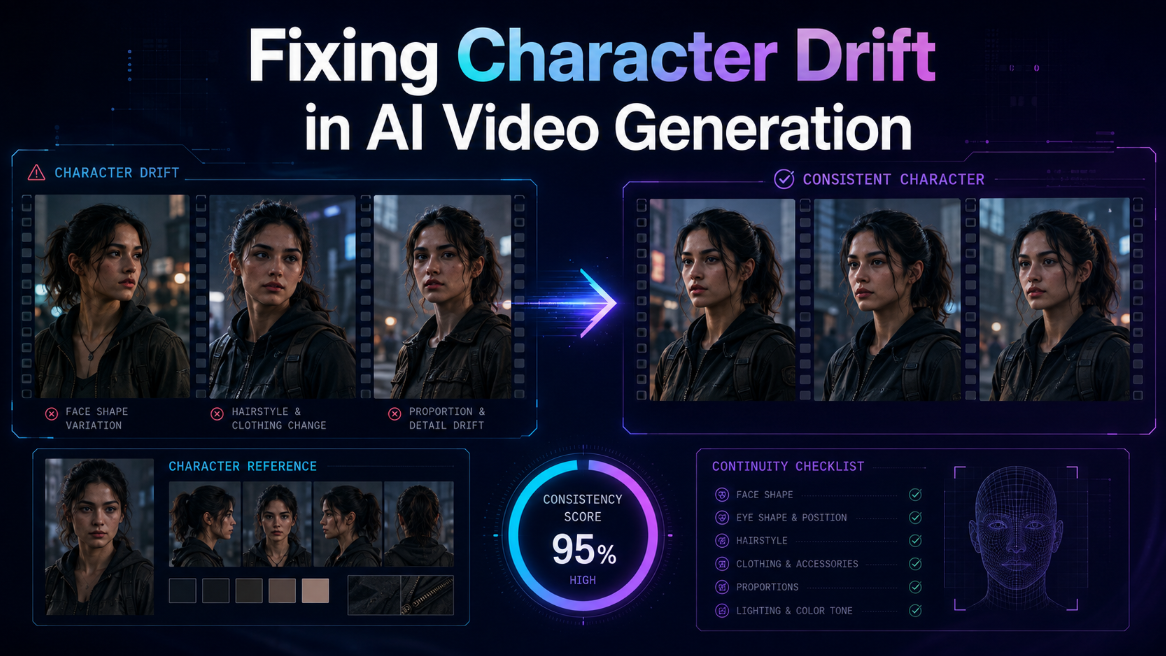
Character drift happens when an AI system treats each clip like a new task and loses track of the approved face, clothing, setting, or visual rules. The fix is to lock clear references, track each story state, reuse the same project context, and match each shot to the right model.
Your lead character looks right in shot one. By shot four, her jaw is wider, her coat has changed, and her age seems different. Fixing character drift in AI video generation means stopping those changes before they break the story.
The problem matters beyond filmmaking. Forbes reports that 91% of businesses used video as a marketing tool in 2023. As more films, ads, and social stories use generated footage, visual continuity becomes part of basic quality control.
The practical answer is simple: define the character once, create clean references, lock approved choices, and carry the same context into every shot. Use separate references for planned changes, such as a new costume or injury. Then review each generation against the project record.
Why Do AI Characters Drift?
AI characters drift because each generation can interpret the same description in a new way. A prompt such as “young detective in a dark coat” leaves many details open. Without locked visual references and shared project context, the face, body, clothing, lighting, and age can change between clips.
Clip memory is not project memory
A video model creates what you ask for in the current request. It may not know which nose shape, coat texture, or hair part you approved three scenes earlier. Repeating a text description helps, but words rarely capture every visual detail.
This is why project memory for character consistency matters. A stable workflow stores the selected face, voice, wardrobe, location, and style. It brings those choices back when the next shot is made.
Small details reveal the drift
Viewers often notice identity changes through small clues before they can explain what feels wrong:
- Eye shape, jaw width, skin marks, or hairline
- Height and body build beside another character
- Jewelry, buttons, scars, glasses, or tattoos
- Fabric color, fit, texture, and wear
- Voice, accent, speaking pace, and lip movement
- Lighting direction and color in the same location
Build a Character Bible First
A character bible records what must stay the same. Build it before generating full scenes.
Consider Maya, a fictional filmmaker making a mystery about a violinist in a rainy city. Her test clips look polished, but the violinist changes between scenes.
Maya locks the face, height, hairstyle, violin case, blue coat, silver ring, speaking style, and lighting rules.
Define identity before movement
Start with a clean face portrait and a full body view. Then create front, side, back, and angled views.
A useful character record includes:
- Name, age range, and role
- Face shape, key marks, hair, and eyes
- Height, build, posture, and movement
- Main clothing, footwear, and accessories
- Voice, accent, pace, and emotional range
- Approved references for each camera angle
The character sheet workflow for consistent video recommends clear angle views plus face and medium close views. It also suggests locking the approved sheet before video generation starts.
Separate the person from the scene
Do not make one reference carry every detail. Keep the character, clothing, prop, and location as separate approved assets. This makes a mismatch easier to trace.
For Maya, the violinist remains one character. The blue coat is one wardrobe state. The violin case is one prop. The street and concert hall are separate location records.
How Do You Lock Character Identity?
Lock identity by choosing one approved character sheet and treating it as the main reference for every shot. Keep the face, body, wardrobe, and voice records clear. When the story changes the character, create a new approved state instead of rewriting the original reference.
Create clean visual references
Good references reduce guesswork. A face close view helps with eyes, skin marks, and hair. A full body view helps with height, build, and clothing shape. Side and back views help when the camera moves around the actor.
Follow this order:
- Generate several face options.
- Choose one face and stop changing it.
- Build angle views from that approved face.
- Create separate clothing and prop records.
- Test one close view and one wide view.
- Lock the version that works in both.
Track each story state
A character should change when the story requires it. The mistake is letting that change happen without a record.
Create a new state when the character:
- Removes or adds clothing
- Gets wet, dirty, bruised, or older
- Changes hair or makeup
- Picks up or loses an important prop
- Moves into a different time period
Use clear labels, such as “Maya scene 1 clean coat” and “Maya scene 6 torn coat.” Clear labels help the team and the AI system choose the right reference.
Reference Discipline Across Every Scene
Character consistency improves when you control what changes. For each new shot, keep most variables fixed and change only what the scene needs.
In Maya’s mystery, shot eight needs a low camera angle and faster movement. The face, coat, ring, violin case, street light, and rain remain fixed. Only the framing, action, and camera movement change.
Keep variables separate
Before generating a shot, write a short continuity note:
- Character state: blue coat, dry hair, silver ring
- Location state: wet street, cool light, light rain
- Action: turns after hearing footsteps
- Camera: low angle, slow push forward
- Emotion: alert and controlled
Review before you regenerate
When a shot drifts, compare the output with the approved references and find the exact break. Check these areas in order:
- Face and body identity
- Clothing and accessories
- Prop shape and scale
- Location layout and lighting
- Screen direction and camera position
- Voice and performance
If the ring is missing, fix the ring reference or the shot note. Do not rewrite the face, coat, location, and camera instructions. A narrow correction protects the parts that already work.
How Does Invideo Agent Two Help?
Invideo Agent Two helps by keeping the project’s cast, world, rules, references, and approved decisions in shared context. It brings these steps into one project-based workflow. It can read scripts, treatments, reference material, and footage, then carry relevant details into later shots. This turns continuity from repeated prompting into an ongoing production process. It can hold the script, cast, locations, rules, approvals, and model choices together. You still decide what belongs on screen.
Context keeps decisions connected
The invideo context and memory system can store project material, cast details, locations, visual rules, references, approvals, and rejected choices. A filmmaker can set the world once, then create a separate brief for each scene.
For example, invideo Agent Two can hold Maya’s full mystery as the project context. Scene briefs can define the alley, concert hall, rooftop, and final reveal. Each brief inherits the same cast and story rules.
This setup can also divide work by role. A casting agent can manage faces, a cinematography agent can manage lenses and lighting, and a costume agent can track wardrobe states. Each role works from the same approved project record.
Choose models without losing context
After invideo Agent Two has locked the cast, Kling AI video generation gives the project access to every Kling model from Kling 2.1 through Kling 3.0. These models can create multi-shot scenes, effects, and planned camera angles from image or video references. The agent carries the approved cast and world details into the chosen shot.
In practice, Maya may use one model for a close performance, another for a moving street shot, and another for a complex effect. The model can change while the project context stays stable.
Which Model Fits Each Shot?
No single model is best for every continuity task. Choose models by shot needs, such as face control, motion, multi-scene structure, camera movement, or effects. Keep the same approved character and location references attached, even when the model changes.
Match the model to the task
There are currently over 200 image, video, audio, and music models in the invideo model collection. Filmmakers can choose a model for each shot.
A simple routing plan may look like this:
- Close performance: favor face and reference control
- Walking dialogue: favor body motion and lip movement
- Action scene: favor motion, physics, and camera control
- Multi-scene sequence: favor planned cuts and cast stability
- Visual effect shot: favor element control and scene editing
- Transition shot: favor first frame and last frame guidance
Test with a small scene
Before generating a full film, test one short sequence with three views:
- A close face shot
- A medium action shot
- A wide shot with another character
Use the same character state in all three. If the face works only in the close shot, improve the full body and angle references. If the clothing fails in motion, improve the wardrobe record.
Conclusion and Your Next Step
Fixing character drift in AI video generation starts with disciplined planning. Lock a clear character bible, separate each asset, record planned story states, and review every shot against the same source of truth. Model quality matters, but stable context matters just as much.
Invideo Agent Two brings project memory, scene briefs, role-based agents, and model access into one workflow. It can help filmmakers keep the same cast, costumes, locations, and creative rules connected across a full production.
Start small, find the first detail that drifts, and fix the system before you scale the story. Which character detail causes the most rework in your current AI video process?
Frequently Asked Questions
What is character drift in AI video?
Character drift is an unwanted change in a character’s identity or appearance between generated shots. The face may shift, the body may change, or clothing and accessories may appear differently. Drift can also affect voice, movement, lighting, and the way a character fits inside the location. These changes can distract viewers from the story.
Why does the same prompt create changes?
A text prompt describes a range of possible visuals, not one fixed person. Each generation can make a new choice within that range. Locked character sheets, approved states, and project memory narrow the range by giving the model clear visual facts to follow across every new shot in the sequence.
How many character references should I make?
Start with a clear face view, a full body view, and front, side, back, and angled views. Add close views for small identity details, such as scars, glasses, or jewelry. Every reference should add useful information instead of repeating the same angle. Add more views only when the camera needs them.
Can a character change clothes safely?
Yes. Create a separate approved wardrobe state for each planned change. Keep the face and body references the same, then attach the correct clothing record to each scene. This makes the change intentional and prevents the new outfit from changing the character’s identity, body shape, visual age, or screen presence.
Do Agentic AI tools remove all drift?
No system removes the need for review. The filmmaker still needs to approve character sheets, check each shot, and correct mismatches before the final sequence is assembled and approved for final public release.