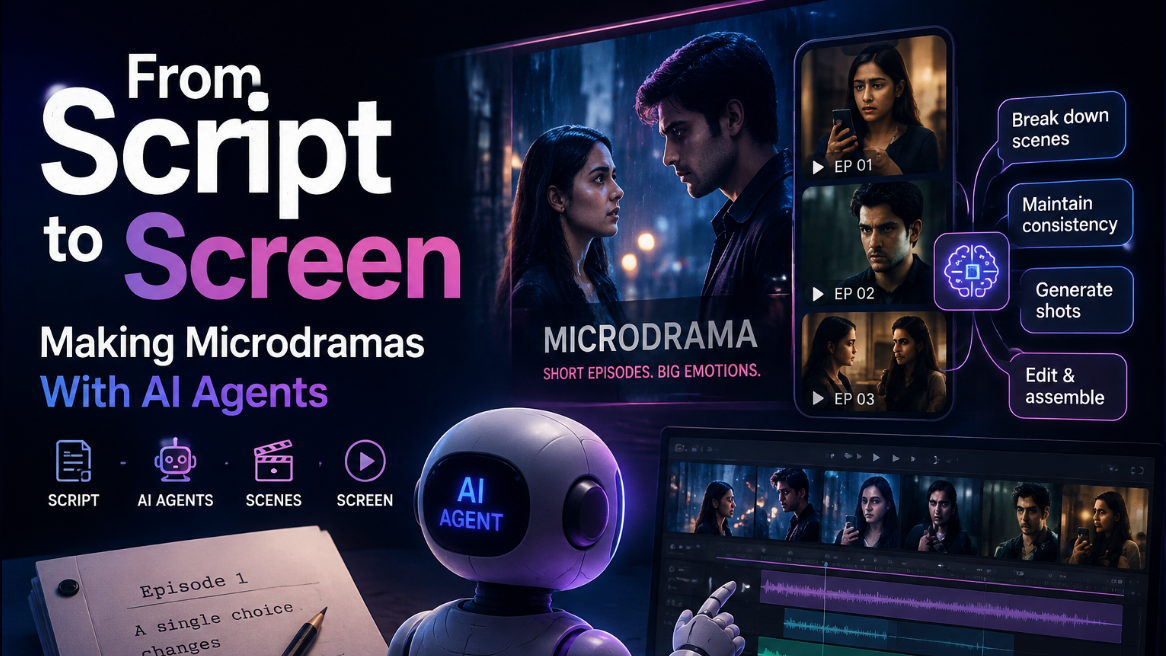
Making microdramas with AI agents works best when you treat the process like filmmaking, not simple video generation. Start with a clear story, build shared project context, lock characters and locations, plan every shot, and review each scene before editing. AI agents can manage much of this production work while the filmmaker controls the story, pacing, performances, and final creative choices.
Microdramas look short on screen, but producing them is not a small storytelling job. A creator still needs recurring characters, clear locations, believable performances, visual continuity, and strong episode endings.
The opportunity is also growing. A 2026 Forbes report on vertical drama growth cited research putting India’s microdrama market above $300 million in revenue, with projections of $4.5 billion by 2030.
This is where AI agents can change the production process. Instead of creating isolated clips and rebuilding the creative brief for every scene, filmmakers can organize an entire series around shared context.
The practical answer is simple: build the microdrama as one connected production. Let AI agents remember the project, divide the script into workable scenes, prepare references, generate shots, and help assemble the edit while you keep control of the story.
How Do AI Agents Build Microdramas?
AI agents can help turn a script into a microdrama by carrying information across the full production. They can break episodes into scenes, prepare shot plans, maintain project references, help generate footage, and support editing without treating every shot as a completely new task.
Instead of starting with the initial video prompt, the procedure typically starts with the entire story. In an agent-based microdrama production workflow, the full script can become the shared source of truth before separate agents work on episode planning and individual shots.
That matters because a microdrama is a sequence of connected decisions. Episode six may depend on a costume change, object, argument, or location introduced several episodes earlier.
A useful workflow looks like this:
- Load the full script and series rules into the project.
- Separate the story into episodes, scenes, and visual beats.
- Create a clear shot plan for each episode.
- Lock recurring characters and important locations.
- Generate and review several usable takes.
- Assemble the selected shots and adjust pacing.
This approach gives the AI more context while giving the filmmaker more places to review the work.
Start With Story and Project Context
A strong microdrama workflow starts before video generation. You need to decide what stays true throughout the series.
That includes each character’s appearance, relationships, wardrobe, important locations, visual style, and major story events. The project context is designed to hold this information so later generations can work from the same creative foundation.
Think of this context as a digital production bible. It should answer basic questions before anyone starts creating scenes.
What should you lock first?
- Character appearance and personality
- Main costumes and later costume changes
- Recurring rooms, streets, homes, or workplaces
- Lighting and visual mood
- Important props
- Episode order and story changes
You can then create smaller briefs for individual episodes. This keeps each episode focused without separating it from the wider story.
How Do You Keep Scenes Consistent?
The safest way to keep a microdrama visually consistent is to create approved character and location references before generating the main shots. Those references give every scene a stable visual starting point instead of asking the model to recreate the cast and world from written descriptions each time.
For characters, that can include front views, side views, close facial references, wardrobe, and expressions. The same idea applies to recurring environments. Locking characters and locations sheets for microdramas is about creating these core references before production begins.
Persistent project memory can then connect those references to future scenes. The persistent context workflow for AI filmmaking keeps scripts, character references, and visual directions available across later generations.
This becomes especially helpful when the story changes a character’s state. A person may lose a jacket, get injured, change clothes, or move into a different lighting environment. Instead of rewriting the entire description, you update the relevant reference and continue from that new state.
Direct Each Shot Like a Crew
Once the story world is stable, the job becomes more like directing.
Instead of asking for a vague cinematic scene, describe the purpose of the shot. Explain where the character is, what they are doing, what emotion matters, where the camera should be, and what the audience needs to notice.
This is also where Invideo Agent Two fits naturally into the filmmaking process. The agent can work with specialized roles for areas such as storyboarding, cinematography, casting, and production planning while sharing the wider project context.
For example, one episode may need:
- A wide shot that establishes the room
- A close shot that captures hesitation
- A reaction shot that changes the meaning of the dialogue
- A moving shot that follows a character leaving
- A final reveal that creates the episode hook
That is much easier to judge than asking an AI system to create an entire episode in one attempt.
How Does Invideo Agent Two Turn Scripts Into Microdramas?
How to make Microdramas with AI Agents (Filmmaking Guide)
Invideo Agent Two helps by keeping production decisions connected while giving filmmakers room to direct individual scenes. It can remember project context, work with specialized creative agents, help plan shots, and choose generation models based on what a specific scene needs.
This model choice can matter when different scenes demand different strengths.
Seedance 2.5 is now live on invideo and opens up the option to direct a full 30-second scene in 4K with up to 50 references. It runs inside the same agentic workflow as other models on invideo: you give direction in plain language, and the agent handles the model-specific building work. Similar AI agent workflows are also becoming important beyond creative production, helping businesses automate communication and support tasks through technologies like AI voice agents.
The important point is not to generate the longest possible scene every time. Longer generation can be useful when a dramatic beat needs continuous action. Shorter shots can still give editors more control over reactions, pacing, and visual rhythm.
How Do You Finish the Final Cut?
The final edit is where separate AI-generated shots become an actual episode. Review the sequence as a story first, then look at individual technical details.
Start by placing the approved shots in script order. Check to see if the emotional beats come at the appropriate moment. A visually impressive shot may still need replacing if it slows the scene or weakens the next reveal.
The current invideo workflow also includes a timeline editing stage where approved material can be assembled with existing project context. This lets the editing process stay connected to the script and selected shots instead of starting with an empty project.
During the final review, check:
- Does the opening create interest quickly?
- Can viewers understand where every character is?
- Do reactions match the dialogue?
- Are character details consistent between cuts?
- Does each shot move the story forward?
- Does the conclusion make you want to see the next episode?
Microdramas have little room for scenes that do not serve the story. Every shot should either reveal information, change an emotion, raise tension, or move the character toward the next decision.
Conclusion
Making microdramas with AI agents works best when you think like a director rather than a prompt writer. Build the story first, lock the visual world, plan each episode, and review shots as parts of a larger sequence.
While several agents and video models manage distinct production duties, Invideo Agent Two can assist that process by maintaining project context connectivity. The creative decisions still belong to the filmmaker.
If you want to explore the workflow, start with one short script and build a single episode. Lock your characters, direct a few important scenes, assemble the cut, and learn from what works before expanding the story into a full series.
What part of microdrama production would you want an AI agent to handle first?
Frequently Asked Questions
What is an AI microdrama?
An AI microdrama is a short episodic story where generative AI supports parts of the production process. The workflow can include script development, character planning, storyboarding, video generation, audio, and editing. It describes episodes as short narrative units that are produced as parts of a connected series rather than unrelated video clips.
Can AI agents create a full microdrama?
AI agents can support most stages of a microdrama, but creative review still matters. They can help break down scripts, plan scenes, create references, generate shots, and organize production. Storytelling, performances, timing, continuity, and which generated takes belong in the final episode are all still things that a filmmaker must evaluate.
How do you maintain character consistency?
Create approved character references before producing the main scenes. Include clear facial views, body proportions, costume details, and any later changes that matter to the story. Keep these references inside shared project context so future shots continue from the same visual source rather than rebuilding the character from written instructions.
Should every microdrama scene be AI-generated?
Not necessarily. What matters is whether each shot serves the story and fits the surrounding footage. A production can combine generated scenes with existing footage, images, sound, or other approved assets when needed. The best choice depends on the scene, the required control, the available references, and how the final sequence needs to feel.