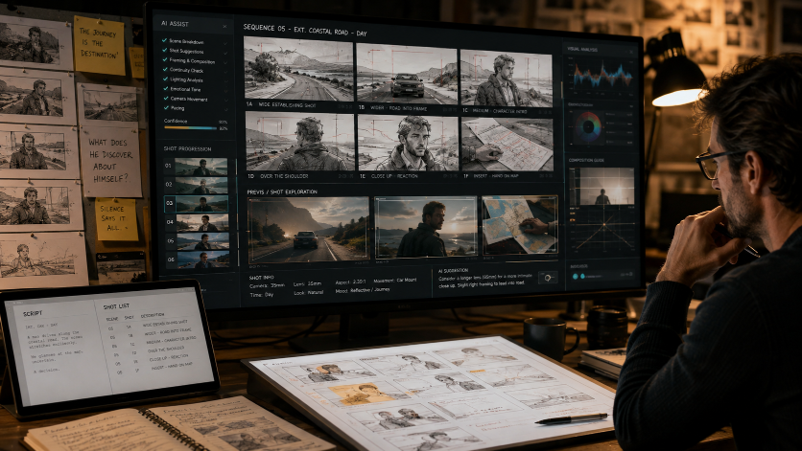
AI can turn a finished script into visual boards faster by breaking scenes into shots, generating frames, and helping teams compare camera, blocking, and pacing choices before production. The best results still depend on clear direction. Use AI to explore options quickly, lock the visual rules that matter, and carry approved storyboard decisions into previs, shot planning, and the final shoot.
Storyboarding can slow down preproduction when every new idea needs another drawing pass. A director may want to change framing, move a character, or test different pacing. Each choice can affect several panels.
AI Filmmaking shortens that loop by helping filmmakers turn scripts and visual notes into boards that can be revised quickly. The goal is not to replace creative judgment. It is to help teams reach useful visual decisions sooner.
There is already a practical example. Entrepreneur reported that Microsoft used generative AI for a Surface ad, including its script, storyboards, and pitch materials. The team said the process saved about 90% of the usual time and cost. Entrepreneur’s report on the Microsoft campaign shows why faster planning matters when many creative choices need review.
AI works best inside a clear process: start with the script, define the look, lock key details, and review the sequence.
How Does AI Filmmaking Speed Storyboarding?
AI Filmmaking can speed storyboarding by reading a script, separating it into scenes and shots, and turning those choices into visual frames. Filmmakers can then test framing, blocking, mood, and pacing without starting every board from a blank page.
The biggest gain is faster iteration. A scene can be explored as a wide master, a tighter emotional version, or a more active camera approach. The filmmaker changes only what needs review.
An AI storyboard generator can turn written scenes into visual panels while keeping the chosen look in view. The director still decides which frames belong in the film.
A useful first pass can include:
- the main action in each shot
- camera distance and angle
- character position and movement
- location and lighting direction
- the emotional purpose of the shot
From Script Pages to Visual Boards
A useful storyboard begins before image generation. First, break the script into scenes, story beats, characters, props, and locations. Then decide what the audience needs to understand in each beat.
In AI Filmmaking, this structure gives the system clear visual goals. If a character enters a kitchen and notices an open window, the board should show how that discovery plays on screen. A wide shot can establish the room, while a closer frame can show the reaction.
Set visual rules early. You might define warm interior light, a fixed costume, or a low camera height. Those rules help new panels feel connected.
The aim is not the prettiest frame. It is a board that answers production questions.
How Can Previs Improve Shot Decisions?
Previsualization helps filmmakers test how storyboard frames work as a sequence before filming. It can reveal pacing, camera movement, screen direction, and coverage needs that are harder to judge from separate still panels alone.
A storyboard can grow into an animatic or a moving sequence. You can watch the scene, test whether an entrance reads clearly, and decide if another angle is needed.
Invideo Agent can help build pre-vis from a script, the chosen look, and the cast. You can direct it toward a storyboard, an animatic, or a higher fidelity sequence, depending on the decision you need to make. Its project context can carry approved characters, locations, and visual rules from planning into later shots.
Filmmakers can use AI Previs to explore how a sequence works before shooting, whether they need a storyboard, an animatic, or a higher-fidelity preview. This makes it easier to judge framing, pacing, movement, and coverage before committing resources to production.
For a deeper walkthrough, this AI previz and storyboarding masterclass explores different ways filmmakers can use agents to previsualize scenes before production.
Masterclass: How to use AI for Previz and Storyboarding
Keeping Characters and Locations Consistent
Fast boards only help when the scene stays coherent. Character faces, clothing, props, room layout, and lighting should remain stable unless the story changes them.
That is why consistency matters in AI Filmmaking. Start with clear reference sheets and scene rules, then carry them across every board.
The invideo filmmaking workflow uses persistent project context for scripts, character sheets, locations, and visual references. That lets a storyboard agent and later production agents work from the same approved information instead of treating every frame as an isolated task.
This matters even more when a project expands across several scenes or episodes.
How Do AI Filmmaking Agents Plan Sequences?
AI Filmmaking agents can divide planning work across roles while sharing project context. A storyboard agent can focus on visual beats, while cinematography, casting, or production agents build from the same approved characters, locations, and scene rules.
Invideo Agent supports that crew-style workflow. Filmmakers can give directorial notes while focused agents handle specific tasks. It can also route shots across different generation models based on each shot.
The recently launched invideo Agent 2 is described as a frontier intelligence agent for serious creative work. Its product brief centers on shared project memory, where role-based agents can exchange briefs, track decisions, and continue from earlier work instead of requiring the whole project to be explained again.
The filmmaker still reviews the board, rejects weak framing, or updates a visual rule. AI changes iteration speed, not who makes the creative call.
What Should You Check Before Shooting?
Before a storyboard becomes a production plan, check whether it answers practical crew questions. A useful board should make the action, geography, camera idea, and emotional beat clear for everyone.
Review the sequence as a film, not as a gallery of strong images. AI Filmmaking helps because fast iteration makes it easier to compare complete versions of a scene.
Check these points before approval:
- Can you follow where each character is in the space?
- Does each shot add new story information?
- Are eyelines and movement directions clear?
- Is there enough coverage for the edit?
- Do wardrobe, props, and lighting stay consistent?
- Does the sequence match the planned aspect ratio and release needs?
Once the sequence is approved, production choices continue into finishing. Choosing the best video format can help when those decisions reach export and delivery.
AI Filmmaking makes storyboarding faster because it shortens the distance between an idea and something you can judge on screen. Scripts can become boards sooner, boards can become moving previews, and visual changes can be tested before the camera rolls.
The strongest workflow still starts with human direction. Define the scene, lock the important visual rules, review the sequence, and keep only the choices that support the story. Tools such as invideo Agent are most useful when they carry those decisions forward instead of asking you to rebuild them for every shot.
If your next project is still living mostly on the page, which scene would you want to see fully boarded before you shoot it?
Frequently Asked Questions
Can AI turn a script into a storyboard?
Yes. AI can break a script into scenes and shot ideas, then create visual frames for review. In AI Filmmaking, the useful part is connecting those frames to story beats, camera choices, character positions, and the wider visual plan. The filmmaker can then compare options and refine the sequence before production.
Does AI replace a storyboard artist?
Not necessarily. AI can speed up rough exploration and repeated revisions, while a storyboard artist brings composition, staging, and storytelling judgment. A team may use AI for early passes, then refine important boards with human input. The right balance depends on the project, its visual needs, and how finished the boards must be.
What is the difference between storyboards and previs?
A storyboard shows key shots as still frames. Previs adds time and movement, often through an animatic or a moving version of the sequence. In AI Filmmaking, an approved visual plan can move from still boards into motion, helping directors judge pacing, screen direction, coverage, and scene flow before filming begins.
How do you keep AI storyboard characters consistent?
Start with clear character references and repeat the same approved details across scenes. Define clothing, hair, body shape, key props, and planned story changes before creating many frames. A shared project context can also help later boards follow those rules instead of rebuilding the full character description for every new shot.
When should filmmakers use AI storyboarding?
AI storyboarding is most useful when you need to explore several shot choices, review a complex scene, test pacing, or explain a visual plan quickly. It can also help small teams prepare clearer references before production. The best time to use it is while major creative choices are still easy to change.